Agentic intelligence for SugarAI, SpiceCRM and SuiteCRM: The agent does the clicking. You make the call.
Write or dictate what you need in Teams, Slack or your CRM’s chat. We build the agent around your processes with you and enable your team to develop it further on its own.
Free of charge, with a needs assessment and an indicative price
Julia Schmidt
Schedule calls with all of today’s leads tomorrow from 10
GoAgentic
Three calls are prepared. The overview is ready for your approval.
GoAgentic is typing
3 calls created
Prepare calls
3 leads for tomorrow, 30 minutes each from 10:00
- T. BergerSales Director · TechSolutions GmbHIn the CRM
- L. BrandtHead of Sales · Nordwerk AGIn the CRM
- P. NowakSales Manager · BluePeak GmbHIn the CRM
ApprovedJ. Schmidt, 10:25
3 calls created
- Customer data stays in the EU
- Nothing without your approval
- With your permissions in the CRM
- Fully European on request
Working with Salesforce, HubSpot, Dynamics or SAP CRM?Your route to GoAgentic
Chapter 1
What changes: Your CRM knows almost everything. Getting to it costs time every day.
The data is there. But every question and every entry leads through screens, filters and mandatory fields. And whatever is tedious gets left undone.

After the customer meeting
- Find contact
- Log meeting
- Add note
- Plan task
- Update opportunity
Five screens for one conversation. So it gets entered in the evening, or not at all.
With GoAgentic
Had a meeting with Müller GmbH, quote by Friday.
The question from management
- Open report
- Set filters
- Pick columns
- Export
- Recalculate
“Which large deals have stalled?” is quickly asked. Until someone has built the answer, time goes by.
With GoAgentic
Which large deals have been stalled for two weeks?
New colleagues
- Training
- Manual
- Questions
- Detours
It takes weeks before someone uses the system with confidence. Until then, they ask colleagues or leave it.
With GoAgentic
Show me everything on Hoffmann Logistik before the meeting.
In practice: A day in sales, run from the chat.
Julia heads sales. Sometimes she writes to the agent, sometimes it gets in touch first, from the morning briefing to tomorrow’s calls. Shown with demo data.
07:30 · Briefing
Direct message with GoAgentic
GoAgentic writes first
GoAgentic is typing
Good morning, Julia. Your day: three meetings, one overdue task and a quote that expires on Friday.
automatic
Daily briefing
Thursday · arrives every morning on its own
- 09:30 Müller GmbHOn site · discuss the quote
- 11:00 Nordwerk AGCall with L. Brandt
- 15:00 BluePeak GmbHDemo for P. Nowak
- Chase the TechSolutions quoteOverdue for two days
- Weber MaschinenQuote expires on Friday
11:20 · After the meeting
Direct message with GoAgentic
GoAgentic writes first
GoAgentic is typing
Your meeting at Müller GmbH is over. How did it go?
Julia Schmidt Head of Sales
Went well. They want 40 licences, quote by Friday.
GoAgentic
GoAgentic is typing
I have prepared four entries. Please review and approve.
with approval
Müller GmbH
Opportunity · 40 licences
- Meeting loggedToday 09:30, on site at Müller GmbH
- Note40 licences requested, start in January
- TaskSend the quote by Friday
- Stage
QualifiedQuote
13:40 · Follow up
Direct message with GoAgentic
Julia Schmidt Head of Sales
Write Berger a short email about our quote from last week.
GoAgentic
GoAgentic is typing
The draft is ready, in the tone of your last emails to him.
with approval
Email to T. Berger
TechSolutions GmbH · Draft
To T. Berger, TechSolutions GmbH
Subject Our quote of 17 September
Dear Mr Berger, I wanted to check whether you have had a chance to look at our quote. I would be glad to go through any open points with you in a short call. Best regards Julia Schmidt
16:15 · Stalled deals
Direct message with GoAgentic
GoAgentic writes first
GoAgentic is typing
Heads up: three large deals have been stalled for over two weeks, €184,000 in total. Hoffmann Logistik is the largest.
read only
Stalled deals
Over €25,000 · no activity for 14 days
- Hoffmann LogistikQuote · M. Braun€82,000
- Weber MaschinenNegotiation · J. Schmidt€61,000
- Brenner MedizintechnikQualified · K. Yilmaz€41,000
17:45 · For tomorrow
Direct message with GoAgentic
Julia Schmidt Head of Sales
Schedule calls with all of today’s leads tomorrow from 10, half an hour each.
GoAgentic
GoAgentic is typing
Three calls from 10:00, 30 minutes each with a 15 minute buffer in between. Please review and approve.
with approval
Calls for tomorrow
Friday from 10:00 · 30 minutes each, 15 minute buffer
- S. KellerPurchasing · Alpina Foods
- M. WagnerHead of IT · Rheinwerk GmbH
- A. ÖzdemirManaging Director · Novatec AG
A real example: An agent in SpiceCRM. This is what it can look like.
A recording from SpiceCRM shows how an agent works in the CRM: it answers questions in the chat, creates leads, reads invoices and builds reports.
 Example
In the video
Proactive: The agent does not wait until you ask.
It gets in touch on its own: with the morning briefing, with reminders before meetings and deadlines, with questions when something is missing. You decide when, and about what.
daily
Good morning, Julia. Three meetings today and one overdue task. The preparation for Müller GmbH is ready.
question
Your meeting at Müller GmbH is over. How did it go? I will prepare the note, task and stage.
ReplyLater
reminder
The quote to Weber Maschinen expires tomorrow, with no response for 15 days. Shall I draft a reminder to the customer?
Create draftNo, thanks
weekly
Your week in review: eleven meetings, four new opportunities, two deals won. Three quotes expire next week.
Daily
The morning briefing: meetings with preparation, tasks due and whatever expires today.
Weekly
Pipeline, changes and risks as the week begins, the review as it ends.
On events
When a meeting is coming up, a deadline draws near, a deal stalls or an SLA is about to be breached.
With a question
If something is missing or unclear, the agent asks instead of guessing. A reply in the chat is enough.
And whatever always runs the same way runs on its own.
The agent handles fixed routines by itself, with a log. Each routine can be paused on its own.
- Assign leads
- Sort enquiries
- Enrich data
- Flag duplicates
Use cases: Where the agent helps your team
A selection from sales, marketing and service, for team members, team leads and management.
Daily briefing in the morning
Meetings, overdue tasks, opportunities close to closing and open customer emails, every morning in Teams, Slack or by email.
Example in the chat: “What’s on today?”
read only
Log conversations in one sentence
A few sentences become a call note, a next task and the updated opportunity. Saved after your approval.
Example in the chat: “Had a meeting with Müller GmbH, quote by Friday.”
with approval
Customer dossier before the meeting
History, open opportunities and cases, latest emails and contacts at a glance, automatically before every customer meeting if you wish.
Example in the chat: “Show me everything on Hoffmann Logistik before the meeting.”
read only
Draft emails from context
Chasing a quote, confirming a meeting or saying thanks after a conversation, with your templates and the data from the CRM. Sent after your approval.
Example in the chat: “Write Berger an email chasing the quote.”
with approval
Update opportunities by chat
Stage, probability, close date and next step in one message. You see exactly what will change beforehand.
Example in the chat: “Move Meier to negotiation, closing end of October.”
with approval
Check and enrich new leads
Research the company, add industry and size, find duplicates and store an assessment with its reasoning in the CRM.
automatic
Data upkeep for your key accounts
Find missing mandatory fields, outdated contacts and duplicates, and suggest corrections for approval.
with approval
Pipeline on demand
Weighted pipeline, changes since last week and the reasons behind them, with links to the deals.
Example in the chat: “How does the Q4 pipeline look for team North?”
read only
Stalled deals and forecast risks
Every week: opportunities without activity, missed close dates and large deals without a next step, with a suggestion.
Example in the chat: “Which large deals have been stalled for two weeks?”
automatic
Assign leads by rules
New leads go to the right colleague by region, industry or workload, with the reasoning as a note. You change the rule in the chat.
automatic
A basis for coaching conversations
Activities and win rates per salesperson as an objective basis for discussion. Works council involvement is clarified as part of the project.
read only
Sales briefing every Monday
Revenue against plan, pipeline, win rate, the largest deals and the biggest risks, briefly summarised in Teams or by email.
Example in the chat: “Send me revenue, pipeline and risks every Monday at 7.”
read only
Ask the CRM in your own words
The answer with figures from the CRM and a link to the report, without filters and without a report editor.
Example in the chat: “Which customers have ordered less this year than last?”
read only
Early warning of customer churn
Less contact, open cases and missing orders looked at together, as a list with a suggested course of action.
read only
Target groups in one sentence
The agent builds the filter, shows the matches and saves the list as soon as you approve.
Example in the chat: “Mechanical engineering in Bavaria, newsletter subscribers, no contact for six months.”
with approval
Campaign copy per target group
Email copy, subject lines and landing page copy, matched to the segment and using data from the CRM. Sending stays with you.
with approval
Follow up on trade fairs and events
Attendee lists or photos of business cards become leads, duplicates are matched and next tasks for sales are prepared.
Example in the chat: “Here is the attendee list from the trade fair.”
with approval
Hand qualified leads to sales
As soon as a lead is qualified, it reaches the colleague responsible with a summary of all contacts and a task.
automatic
Campaign reports in the chat
Opens, clicks, new leads and opportunities per campaign, compared with the previous one.
Example in the chat: “Which campaign brought in the most opportunities this quarter?”
read only
Which leads turn into revenue
Every month: which sources and campaigns actually bring in revenue, with a recommendation for the budget.
read only
Marketing in the management briefing
Cost per lead and per opportunity, and marketing’s contribution to the pipeline, as part of the Monday briefing.
read only
Summarise cases, find solutions
The history in five sentences, similar solved cases, matching knowledge articles and the next steps, as soon as a case lands with you.
Example in the chat: “Summarise case 4821 for me.”
read only
Draft replies to customers
A draft in the customer’s language and your company’s tone, referencing contract and SLA. You review and send.
Example in the chat: “Draft a reply with an appointment for remote maintenance.”
with approval
Triage new enquiries
Emails and forms become cases with category, priority, product and owner. The acknowledgement is ready as a draft.
automatic
Prepare escalations
Timeline, people involved, SLA status and contract value at a glance, plus a draft to brief senior management.
read only
Chat for your customers
On your website or in the customer portal: check a status, open a case, answer common questions. Clearly labelled as AI, with handover to a human, only after the pilot phase.
with customer contact
Warning before an SLA is breached
Cases close to their deadline or long without a reply alert the person responsible and the team lead, with context.
Example in the chat: “Warn me before an SLA is breached.”
automatic
Backlog and workload at a glance
Open cases per team member, priority and age, throughput times and a suggestion for redistributing them.
read only
Spot recurring problems early
The week’s cases grouped by topic: most frequent problems, new fault patterns, affected products, with a note for product management.
read only
Service figures in the management briefing
Number of cases, resolution time, SLAs met, satisfaction and the most important escalations of the week.
read only
Strategic questions for service
Which products cause the most cases, which customers take up the most service time? The answer with figures and a link.
Example in the chat: “Which customers take up the most service time?”
read only
Reports and lists in your own words
The agent runs the matching saved report or builds the query itself: table, figures and link, saved as a report if you wish.
read only
CRM help in the chat
The instructions come from the documentation and your own handbook. New colleagues find their way around faster.
Example in the chat: “How do I add a line item to a quote?”
read only
Bring meetings into the CRM
A Teams or Zoom transcript becomes a note, tasks and updated opportunity fields, ready for approval.
with approval
Capture documents
Business card, enquiry as a PDF or purchase order: the agent reads the fields and creates the record after your approval.
with approval
Voice messages on the road
After a customer visit, a voice message in the chat. It becomes a call note and a next task in the CRM, ready for approval.
with approval
Data quality overnight
Find duplicates, formatting errors and orphaned records. Safe corrections run by rule, the rest goes to your administrators as a report.
automatic
Every task runs with the permissions of the user in question. What you start with, we decide together in the analysis.
Chapter 2
How it works: Write or speak. Review. Approve.
You talk or write to the agent as you would to a colleague. It does the clicking in the CRM: searching, summarising, preparing entries. Like a good assistant: it prepares, you decide.

1 · You write or speak
In Teams, Slack, your CRM’s chat or by email, typed or simply spoken into the microphone. In plain language, without menus or filters.
2 · The agent prepares
It searches, summarises and drafts in the CRM. With your permissions, no more.
3 · You approve
Every change waits for your approval first. You review, approve, and everything is logged in the CRM.
You decide how much the agent may do on its own
Four approval levels, set per task and team. Each one can be withdrawn at any time.
Read only
Answers, lists, reports, dossiers. No changes in the CRM.
Suggest
Every change as a preview. Saved only after your approval.
Autonomous internally
Clearly defined routines such as briefings or deadline warnings run on their own, with a log.
With customer contact
Only after the pilot phase. Clearly labelled as AI, with a human always within reach.
Most teams start with “Read only” and expand once trust is there.
Integration: Works with what you already have
Your team writes where it already works. GoAgentic acts with that person’s permissions in the CRM.
- Microsoft Teams
- Slack
- Chat in the CRM
'%20d='M10.913%2053.581h109.15c6.028%200%2010.914%204.886%2010.914%2010.913v109.151c0%206.027-4.886%2010.913-10.913%2010.913H10.913C4.886%20184.558%200%20179.672%200%20173.645V64.495C0%2058.466%204.886%2053.58%2010.913%2053.58'/%3e%3cpath%20fill='%23fff'%20d='M94.208%2095.125h-21.82v59.416H58.487V95.125H36.769V83.599h57.439z'/%3e%3c/svg%3e)

Understands language and phrases answers. The model depends on the data protection level.
Plans the steps, picks the tools and keeps to your rules and approval levels.
- Search
- Read
- Report
- Create
- Update
- Draft email
readswrites only after approval
- User permissions
- Approval
- Log
- Off switch
- SugarAI (SugarCRM) Cloud
- SugarAI on premises
- SpiceCRM
- SuiteCRMOpen source
Data protection: Your customer data stays in the EU. How sovereign is up to you.
Three levels for hosting and language model. Which one fits, we decide together in the analysis, along with the effort it involves.
- Your CRMSugarAI, SpiceCRM or SuiteCRM, in the cloud or on your premises
- GoAgenticRuns in a data centre in the EU or on your own servers
- Language model for contentDepending on the level, Mistral, OpenAI, Anthropic or hosted by you. Receives only the fields the task needs
- Most common
Standard
- Hosting
- GDPR compliant cloud in the EU, e.g. Google Cloud
- Language model
- Mistral, OpenAI or Anthropic
Sovereign
- Hosting
- A provider based in the EU, e.g. Hetzner in Germany
- Language model
- Mistral
Private
- Hosting
- Your own servers. Fully open source with SuiteCRM if you wish
- Language model
- Hosted by you, à la carte, the model of your choice
-
With the user’s permissions
No shared account, no full access.
-
Data minimisation
Only the fields the task requires.
-
Fully logged
Every question, preview, approval and change.
-
GDPR and data processing
DPA, record of processing activities and deletion concept are part of the project.
-
EU AI Act
Users and customers are told when AI is involved.
-
Can be switched off any time
Each routine on its own, the whole agent with one switch.
Chapter 3
Why start with us: The software comes from the vendor. We make it work.
SugarAI and SpiceCRM come with their own AI features. For some teams that is enough. Most companies, however, work with their own processes, rules and special cases that no standard covers. That is exactly where we start.
The vendor’s AI features
- The same for every customer
- Developed along the vendor’s roadmap
- Works inside the CRM
GoAgentic
- Tailored to your processes and rules
- Built to your needs, piloted within weeks
- Also works in Teams, Slack and by email
- Complements the vendor’s features, replaces nothing
Guide
We show you where an agent pays off and where it does not. If the standard is enough, we tell you so.
Developer
Whatever your process needs, we build. Including what is on nobody’s roadmap.
Accelerator
From the first conversation to a working agent takes weeks, not quarters. Partly because we build customisations with agents ourselves.
One partner who understands your business and talks to you as an equal, from the first idea to live operation.
Not on SugarAI, SpiceCRM or SuiteCRM yet? Switch and go agentic. In one move.
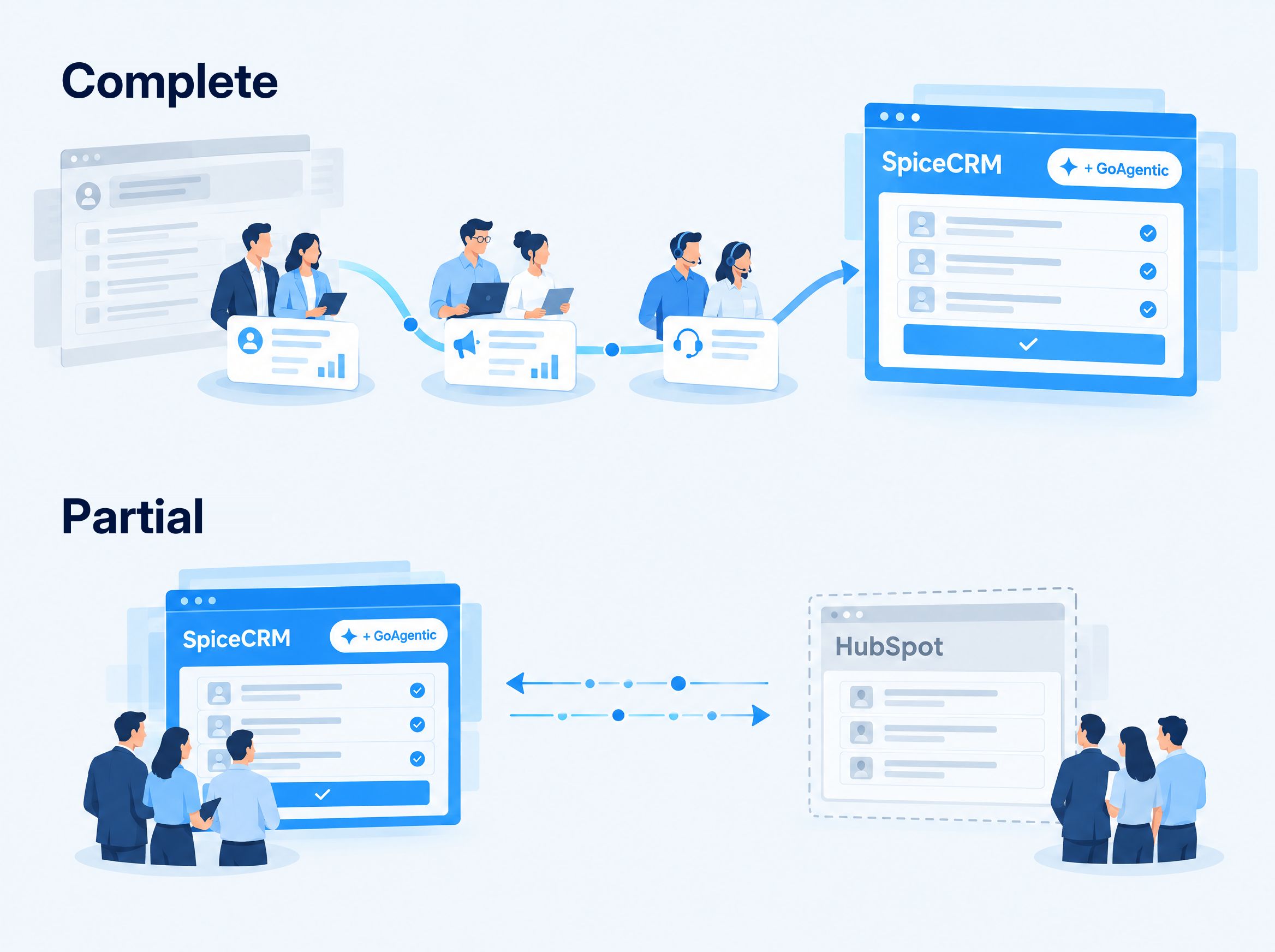
Working with Salesforce, HubSpot, Microsoft Dynamics or SAP CRM? Then we combine your move to SugarAI, SpiceCRM or SuiteCRM with your agent.
-
Complete or partial
All teams switch, or new areas, departments or sites go first. Whatever stays on your current system, marketing for example, we connect.
-
Proven migration
Tools and concepts for data, processes and integrations are ready to use.
-
A familiar interface
SpiceCRM works with an interface that Salesforce users already know.
-
One project instead of two
Analysis, switch and agent from a single partner.
Pilot partners: We are looking for companies that want to lead the way with us.
GoAgentic is new. In our own company the agent already works alongside us every day. Now we are looking for the first companies to have it developed for their own processes.
- Preferential terms for the analysis and proof of concept
- Direct influence on how GoAgentic evolves
- Direct access to our development team
In return, we may report on your project.
Apply as a pilot partner
Chapter 4
Our approach: Step by step. We only move on with your approval.
Just as with the agent itself: after every phase, you decide whether to continue. That keeps your risk manageable at every step.
Demo and needs assessment
freeA demo with your questions, a short questionnaire, a conversation together.
ResultIndicative price
- You decide
Analysis
fixed priceYour CRM, your processes and permissions. Together we agree how success will be measured.
ResultConcept, success criteria, firm offer
- Continue or stop
Proof of concept
as quotedThe agent works with your data on the agreed tasks.
ResultEvidence against the success criteria
- Continue or stop
Pilot
one teamOne team uses the agent in daily work, first read only, then with approval.
ResultExperience from real use
- Rollout yes or no
Rollout and enablement
all teamsMore teams, training, handover to your administrators.
ResultYour team develops the agent further on its own
Phases 1 to 3 · We buildPhases 4 and 5 · We build togetherAfter that · You build, with us if you wish
How long does it take?
We plan the effort in person days, not calendar weeks. If everyone is available on both sides, the proof of concept is ready about four weeks after the analysis starts. Holidays and daily business move the date, not the price.
And if we switch CRM?
Then the move sits between the analysis and the proof of concept. The analysis includes the migration concept. About switching
What remains when we leave: a team that develops its agent further on its own.
Frequently asked questions: What companies want to know before they start
What is GoAgentic by MyCRM?
GoAgentic by MyCRM is an AI agent for SugarAI (SugarCRM), SpiceCRM and SuiteCRM. You tell it what you need in Teams, Slack, your CRM’s chat or by email. It searches, summarises and prepares entries in the CRM, with your permissions. Nothing is saved until you approve it. MyCRM from Esslingen, Germany, builds it around your processes.
Do we have to switch CRM?
If you use SugarAI, SpiceCRM or SuiteCRM: no. If not, we offer the switch, complete or partial, and combine it with your agent. More on switching
How is GoAgentic different from the AI in SugarAI and SpiceCRM?
The vendor’s AI is the same for every customer and develops along the vendor’s roadmap. We tailor GoAgentic to your processes, rules and special cases, and it also works in Teams, Slack and by email. It complements the vendor’s features and replaces nothing. More on this
Does GoAgentic also work with SugarAI on our own premises?
Yes. GoAgentic works with SugarAI (SugarCRM) in the cloud and on premises, with SpiceCRM and with SuiteCRM. GoAgentic itself runs in a data centre in the EU or on your own servers. About integration
What does it cost?
The demo and needs assessment are free and end with an indicative price. The analysis is a fixed price package. It ends with a firm offer for the next steps. And it usually costs less than you think, because we build on proven agent technology. After every phase, you decide whether to continue.
Is there an option without licence fees?
Yes. SuiteCRM is open source and freely available. Together with a language model you host yourself, it makes a fully sovereign setup, on your own servers or with a provider in Germany. Free of licence fees does not mean free of cost: implementation and support remain, but the ongoing licence fees per user disappear.
Is this software off the shelf?
No. But for us, custom does not mean starting from scratch. We build on proven agent technology and adapt it to your processes. That saves time and budget.
How soon can we start?
We plan the effort in person days. If everyone is available on both sides, the proof of concept is ready about four weeks after the analysis starts.
Which language models are used, and where do they run?
That depends on the data protection level: Mistral, OpenAI or Anthropic in Standard, Mistral in Sovereign, and in Private a model of your choice that you host yourself. Which level fits, we decide together in the analysis.
Is the agent GDPR compliant?
It is built for it. Your customer data stays in the EU, the language model receives only the fields a task needs, and every action is logged. DPA, record of processing activities and deletion concept are part of the project. How sovereign the operation is, you decide with one of three levels. About data protection
How secure is the agent?
No technology comes with an absolute guarantee, least of all one that evolves as fast as AI. That is why we keep your agent’s security technology up to date as a service: as in a car, we fit the seatbelts and make sure with you that they are worn. So you can be confident you have done everything possible.
Does the agent see more than I do?
No. The agent works with your permissions in the CRM: whatever you are not allowed to see, it cannot see either. There is no shared account and no full access.
Which channels are supported?
Microsoft Teams, Slack, a chat directly in the CRM and scheduled messages by email. Further channels we discuss in the needs assessment.
Demo and needs assessment: See GoAgentic with your own questions.
In 30 minutes we show you the agent on a CRM with demo data, ideally with the questions that come up at your company every day. Afterwards you receive a short questionnaire that we go through together. At the end, you get an indicative price with no obligation.
- Free and without obligation
- For SugarAI, SpiceCRM and SuiteCRM, in the cloud or on your premises
- A reply within one business day
Prefer to call? +49 711 50887827-0
Go agentic.
We will get you there.
We will get back to you
Thank you, we will be in touch.
You will receive a reply with suggested dates within one business day.